
Windows Setup
How to install PyVISA on Windows with NI-VISA or Keysight IO Libraries drivers, virtual environments, and corporate proxy configuration.
PyVISA working on Windows with NI-VISA in 10 minutes.
Quick Start
# 1. Download and install NI-VISA from ni.com (registration required)
# 2. Install PyVISA
pip install pyvisa psutil zeroconf

# 3. Verify
python -c "import pyvisa; print(pyvisa.ResourceManager().list_resources())"
Step-by-Step Installation
Download the NI-VISA Driver
NI-VISA is the most tested VISA backend for PyVISA. Register at ni.com, then download the NI Package Manager.
Install the NI-VISA Driver
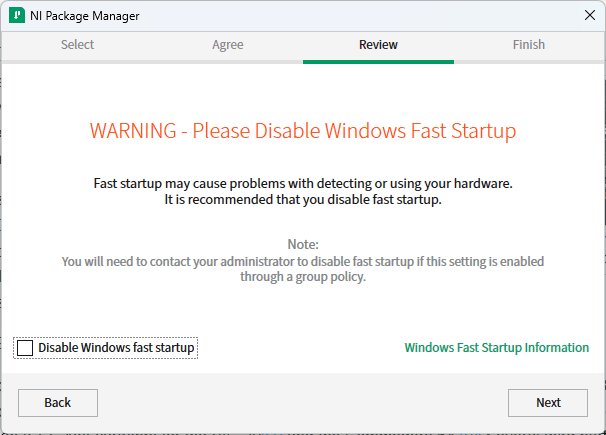
The installer will ask you to disable Windows Fast Startup.
Fast Startup on production machines
On a development laptop, Fast Startup won't affect your setup. On production machines, disable it. Fast Startup can prevent interfaces from resetting, causing VISA to detect stale devices.
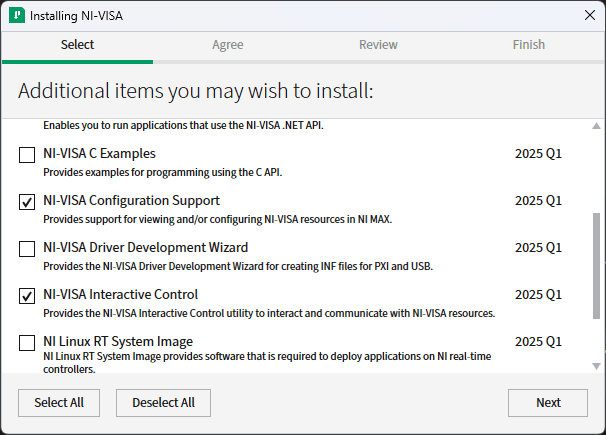
After installing the NI Package Manager, it asks what packages you want.
Select both:
- NI-VISA Configuration Support: view and configure instruments
- NI-VISA Interactive Control: test VISA communication manually
Uncheck everything and click next. Only the VISA runtime is needed.
The VISA runtime installs regardless of your selection. Reboot after setup.
Install PyVISA
PyVISA supports Python 3.6+. Install Python from the Microsoft Store or python.org.
Virtual environment (recommended)
python -m venv .venv
Set-ExecutionPolicy -Scope CurrentUser -ExecutionPolicy RemoteSigned
.venv\Scripts\activate
Install packages
pip install pyvisaFor networked instruments, also install:
pip install psutil zeroconfVerify installation
import pyvisa

rm = pyvisa.ResourceManager()
print(rm.list_resources())
Expected output (varies by connected instruments):
('ASRL3::INSTR', 'ASRL4::INSTR', 'USB0::VID::PID::SN::INSTR')Log measurements automatically
Once PyVISA is running, connect it to TofuPilot to log and analyze every test result with pass/fail status and traceability. Free to start.
Corporate and Enterprise Environments
Proxy and Firewall Configuration
# Install PyVISA behind a corporate proxy
pip install --proxy http://proxy.company.com:8080 pyvisa psutil zeroconf
Group Policy and Permissions
# Check current execution policy
Get-ExecutionPolicy

# For corporate environments, use RemoteSigned
Set-ExecutionPolicy -ExecutionPolicy RemoteSigned -Scope CurrentUser
Silent Installation for IT Deployment
@echo off
REM Silent NI-VISA installation
NIPackageManager.exe --accept-license --install-packages "ni-visa"

REM Silent Python + PyVISA installation
pip install --quiet --no-input pyvisa psutil zeroconf
Advanced Configuration
Multiple VISA Runtimes
If you have both NI-VISA and Keysight IO Libraries installed, you can target a specific runtime:
import pyvisa

rm_ni = pyvisa.ResourceManager("C:/Windows/System32/visa32.dll")
rm_ks = pyvisa.ResourceManager("C:/Program Files/Keysight/IO Libraries Suite/bin/visa32.dll")

print(f"NI-VISA found: {rm_ni.list_resources()}")
print(f"Keysight found: {rm_ks.list_resources()}")
Connection Parameters
| Parameter | Description | Default |
|---|---|---|
chunk_size | Buffer size for data transfers (bytes) | 20480 |
timeout | Operation timeout (ms) | 2000 |
write_termination | Line termination for writes | \n |
read_termination | Line termination for reads | \n |
import pyvisa

rm = pyvisa.ResourceManager()
inst = rm.open_resource("USB0::0x1234::0x5678::SN::INSTR")

inst.chunk_size = 1024 * 1024  # 1 MB for large transfers
inst.timeout = 30000  # 30 seconds for slow instruments
Virtual Machines and WSL
VMware/VirtualBox: Enable USB passthrough for USB instruments.
WSL: PyVISA doesn't work inside WSL. Use Windows Python instead:
/mnt/c/Python39/python.exe -c "import pyvisa; print(pyvisa.ResourceManager().list_resources())"Troubleshooting
Device Not Found
- Check physical connection (cable, power)
- Open Device Manager (
devmgmt.msc), look for unknown devices under "Other devices" - Open NI-VISA Interactive Control and try connecting manually
- If that fails, the issue is hardware or driver related
Common Errors
Driver Conflicts
If multiple VISA runtimes conflict:
- Uninstall manufacturer-specific VISA (Keysight, R&S)
- Uninstall old NI-VISA versions
- Restart
- Install latest NI-VISA clean
Network Instrument Firewall Ports
| Protocol | Port |
|---|---|
| VXI-11 | TCP 111 + dynamic |
| HiSLIP | TCP 4880 |
| Raw Socket | TCP 5025 (typical) |
Alternative VISA Backends
PyVISA-py (Pure Python)
No VISA runtime required. Limited USB support (needs libusb).
pip install pyvisa-py
python -c "import pyvisa; rm = pyvisa.ResourceManager('@py'); print(rm.list_resources())"
Keysight IO Libraries Suite
Better performance with Keysight instruments. Free download from the Keysight website.
R&S VISA
Optimized for Rohde & Schwarz instruments. Download from the R&S support portal.
